

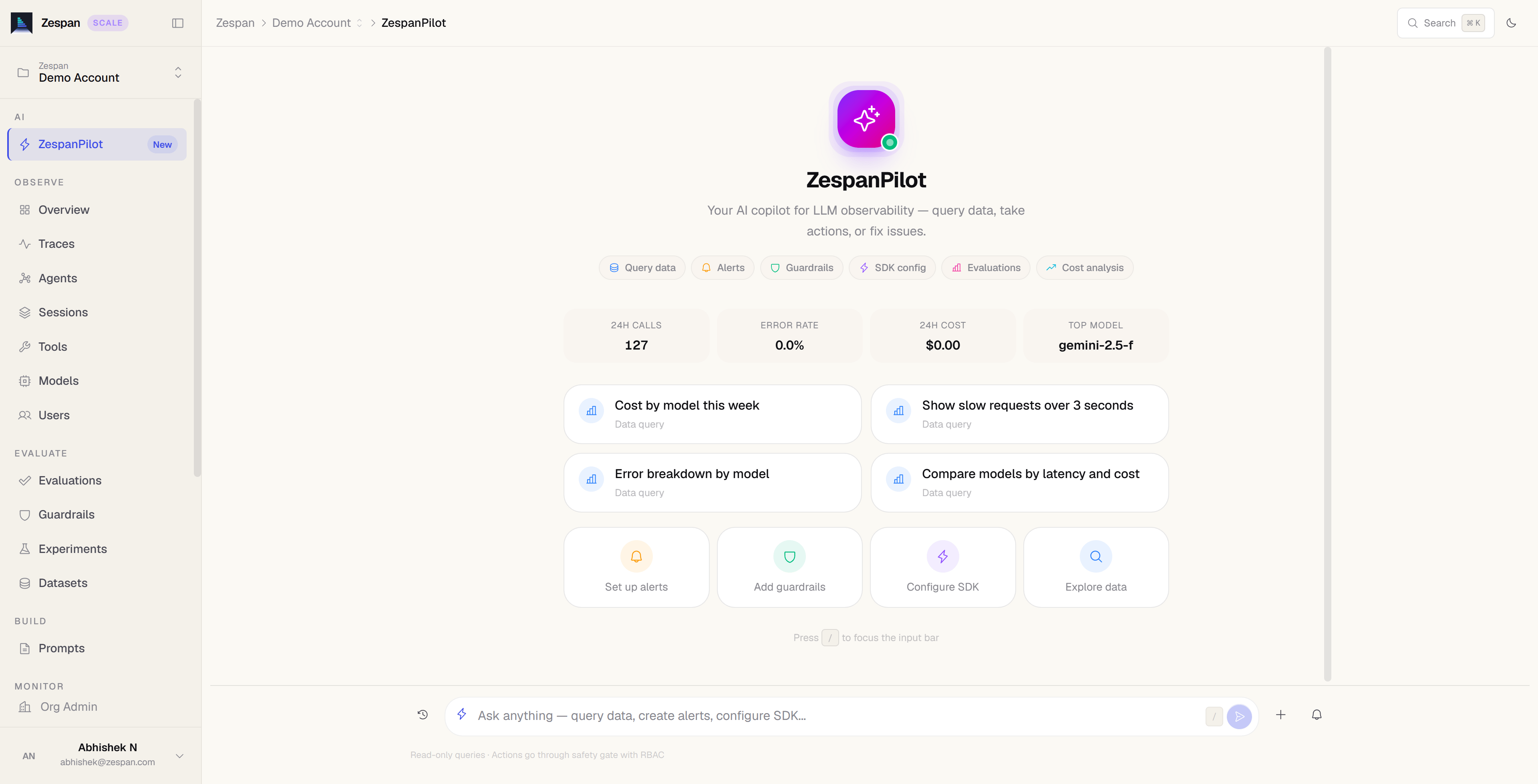
Jump to the message box: on the Pilot page, press ⌘K / Ctrl+K (or /) to focus the chat input.
ZespanPilot is available starting on the Solo plan. On Free, the Pilot sidebar item is visible but opens an upgrade prompt.
Opening ZespanPilot
- Click Pilot in the left sidebar, or go to
/pilotin your project - Press ⌘K / Ctrl+K (or /) on the Pilot page to jump to the message box
- Click Ask Pilot in any anomaly or alert notification banner
Getting oriented
New to Zespan? Pilot answers three orientation questions from your project’s real state and from the product Glossary, not from guesses. The Pilot page always lists them under Getting oriented, and a page with nothing to show offers Ask ZespanPilot next to its main action.
A locked page (one your plan does not include) has Ask ZespanPilot about , which asks “What is the page for?”. Pilot answers from the same “what it is for” and “Come here when” lines the page shows in its header.
A step counts as done once it has ever been done in the project, the same rule as the Set up chip in the sidebar: deleting an evaluator later does not turn its step back into “not done”. If Zespan cannot check a feature at that moment (for example, trace storage is briefly unreachable), Pilot says it could not verify that step rather than calling it done or telling you to set it up. The sidebar leaves the Set up chip off in that case. The SDK step is done once the project has received its first trace.
In the shared demo, Pilot answers the starter questions on its page and in the Ask Pilot panel with stored answers written from the demo’s data, with no AI usage. Any other message gets “Sign up or open your project to ask your own.” Demo conversations are not saved. See Quickstart → Explore the demo.
What ZespanPilot can do
ZespanPilot has direct write access to the following resources in your project. It reads context from your live metrics, trace data, and configuration before suggesting or taking action.Alert management
Create, modify, snooze, or delete alert rules. “Silence the error-rate alert for the next 2 hours” or “Create a new alert if p99 latency exceeds 5 seconds.”
Guardrail management
Enable, disable, or update guardrail policies. “Disable the toxicity guardrail on the demo project” or “Add a new guardrail that blocks requests about competitors.”
Prompt management
Create new prompt versions, update labels, and roll back to previous versions. “Roll back the support-reply prompt to the previous production version.”
SDK config
Push real-time configuration changes to running SDK instances. “Switch all GPT-4o calls to GPT-4o-mini” or “Set the sample rate to 10% for one hour.”
Cost analysis
Explain cost spikes, surface top-spending models, and generate optimization recommendations on demand.
Incident investigation
Correlate anomalies, trace errors, and configuration changes into a coherent timeline with a plain-English explanation.
Multi-trace investigation
Investigate a recurring Issue across its sample traces, not one at a time. “Investigate the rate limit issue” reports whether the occurrences share one root cause or are several different failure modes that happen to share the same verdict, operation, and error code — and says so plainly when an Issue is mixing more than one problem.
Evaluator authoring
Create an evaluator by describing what you want scored. “Create an evaluator that checks whether replies stay on topic” picks the right built-in metric and creates the definition; follow up with “run it on last week’s traces.”
Verified and unverified data answers
When you ask ZespanPilot a question about your data (“which model cost the most last week?”), it writes a query against your project’s data, runs it, and explains the result. Before it shows the answer, Zespan runs an independent check on whether that query actually answers what you asked. The result appears as a badge on the data card:
Pilot answers most data questions from a single generated query, which is faster and cheaper. If that query fails to run, fails the grounding check, or is rejected by the answer check, Pilot automatically generates several candidate queries and compares them. When a question can reasonably be read more than one way and the candidates give different answers, Pilot doesn’t pick one. It asks you for a more specific question, such as naming the metric, the time range and how to group the results.
Pilot also declines questions your project’s data can’t answer, such as customers or revenue, which Zespan doesn’t store, or a term with no definition such as “unhealthy”. It tells you what is missing instead of guessing.
Where the figures in an answer come from
Pilot’s data tools return every figure with an id. The AI model writes the id, not the number, and Zespan inserts the exact value from the query result, formatted the same way every time ($12.40, 2,100 ms, 0.96%, 1.2k tokens). Differences, ratios, percentage changes, shares of a total, rankings and counts are computed by Zespan from those values, never by the model. A sum is only computed over values in the same unit and time window, and a figure computed from results that may be incomplete (cut at the row limit, sampled) is marked as such. Each inserted figure is underlined with the number of the query it came from. Select it to see where it came from: the query, the row (for example the model), the column, the exact stored value, the time window and any filters. For a computed figure you also see the operation and every value it used. View query jumps to that query’s card. Zespan also checks each inserted figure against the words around it: the model, agent or environment the sentence names, the metric (cost, calls, error rate, p95 latency…), the time window, and words such as “increased” or “cheaper” against the sign of a change. A figure whose sentence says something else, for example “gpt-4o cost $3.10" when $3.10 is another model’s cost, keeps its value but is marked ⚠ conflict, and its popover says what the sentence mentions and what the value is for. The line under the answer says how its figures were sourced:
None of these states says the answer is correct: the query itself may answer a slightly different question. Answers you reopen from your history keep their footer and figure details.
Ids are only valid within one answer. For a follow-up such as “and for last week?”, Pilot runs the query again rather than reusing a figure from an earlier answer. Text from your own data, such as a model or agent name, can never be read as a figure id.
Where it started
When you ask Pilot about a trace, it reads the stack-layer attribution you are allowed to see for that trace (the same one the dashboard shows, see Stack layers) and may only word a claim the way that attribution allows:
After the reply is written, Zespan checks each layer claim against the attribution. A claim that is stronger than the attribution, names a layer that is not in it, or names a vendor or a model next to a layer is not removed from the answer; it is listed under the answer as a statement that was not checked, the same place unchecked statements are listed. Where no attribution is shown to you, Pilot has none to claim from.
Personal data in ZespanPilot
Before ZespanPilot sends anything to an AI model, it redacts personal data from it. Data Pilot reads from your traces and other stored records is always redacted — email addresses, card numbers, and similar identifiers are masked. If your project has server-side PII redaction turned on, your typed questions and the conversation history are redacted too, with your project’s PII preset; with it off, your own typed question is sent as written. If redaction of one value fails, only that value is replaced with[REDACTION_FAILED].
Because stored data is already redacted at ingest when the project setting is on, Pilot can’t look up an end user by their raw email address in that case.
AI-generated content
ZespanPilot answers carry the notice AI-generated by <model> — may be inaccurate; check important figures., and the Pilot header says you’re chatting with an AI assistant. The notice names the coordinating model Pilot is currently set to use; a specialist model may have written part of an answer.Your own LLM connections for evaluators, the Playground, and simulations are separate from ZespanPilot and unchanged.
Safety gates
ZespanPilot applies two levels of safety before executing any write action: Role check. Members with the Member role cannot trigger any write action. Admins can execute most actions. Owners have unrestricted access. If your role is insufficient, Pilot explains what permission is needed and who to contact. Confirmation for every write. Pilot presents a confirmation card before executing anything that changes state — not only destructive or broadly impactful operations like deleting an alert rule, disabling guardrails, changing model routing or settingdisable_tracing: true, but also smaller writes such as snoozing an alert, acknowledging or resolving an incident, scheduling an evaluation, or setting a budget. The card shows exactly what will change and gives you a Confirm or Cancel button.
Only read actions run without a confirmation step — listing prompts, policies, guardrails, alerts, incidents or issues, diffing two prompt versions, and root-cause analysis on a trace or an issue. Those return information and change nothing.
Example conversations
The following examples show the kinds of requests ZespanPilot handles well:Investigating a cost spike
Investigating a cost spike
You: Why did my costs spike this morning?Pilot: I can see a 340% cost increase between 9:00 AM and 10:30 AM today. The spike is concentrated in the
gpt-4o model — 847 requests were made in that window compared to your 7-day average of 210. The largest trace was from session sess_abc123, which made 14 sequential GPT-4o calls with an average of 3,200 input tokens each. That session alone cost $0.47. The spike correlates with a deployment at 8:52 AM — it looks like a new feature is making more LLM calls than expected.You: Create an alert if hourly GPT-4o cost exceeds $5.Pilot: I’ll create an alert rule with metric cost_usd, condition >, threshold 5.00, window 60 minutes, model filter gpt-4o. Does that look right?You: YesPilot: Alert rule “GPT-4o hourly cost > $5” created. It will be evaluated in the next 5-minute cycle.Switching a model at runtime
Switching a model at runtime
You: GPT-4o is down. Switch all calls to GPT-4o-mini immediately.Pilot: I’ll push an SDK config rule to redirect all
gpt-4o calls to gpt-4o-mini across all running instances. This is a high-risk operation — it affects all active API key holders for this project. Confirm?You: ConfirmPilot: Config rule applied (version 12). Running SDK instances will pick up the change within the next flush cycle (~2 seconds). I’ll create a reminder to remove this rule — how long should the override stay active?You: 1 hourPilot: Done. I’ve set the rule to expire in 60 minutes. You’ll receive a notification when it’s removed.Rolling back a prompt
Rolling back a prompt
You: The support-reply prompt is producing bad responses. Roll it back to the last stable version.Pilot: The current production version of
support-reply is v8 (deployed 2 hours ago). The previous production version was v7. I’ll move the production label from v8 back to v7. Confirm?You: YesPilot: Label updated. support-reply version 7 is now live on production. Version 8 still exists in staging if you want to review and fix it.Audit log
Every action ZespanPilot takes is written to the audit log with full attribution. To review the log, open Audit log in the Govern group of the sidebar (see Finding your way around the dashboard). Each entry shows:- The timestamp of the action
- The user who triggered it
- The action type (e.g.,
alert.create,sdk_config.update,prompt.label_update) - The before and after state (for updates)
- Whether the action required and received confirmation
Self-tracing
ZespanPilot traces its own AI calls through Zespan. You can see Pilot’s model calls in your traces view under thezespanpilot agent tag. This means Pilot’s own token usage and latency count against your event quota — but it also means you have full transparency into how Pilot is using AI to serve your requests.