

production or staging), your running application fetches prompts by label at runtime using the SDK, and — before a risky change ships — you can run a quality gate that scores a candidate version against the current production baseline and blocks the release if it regresses.
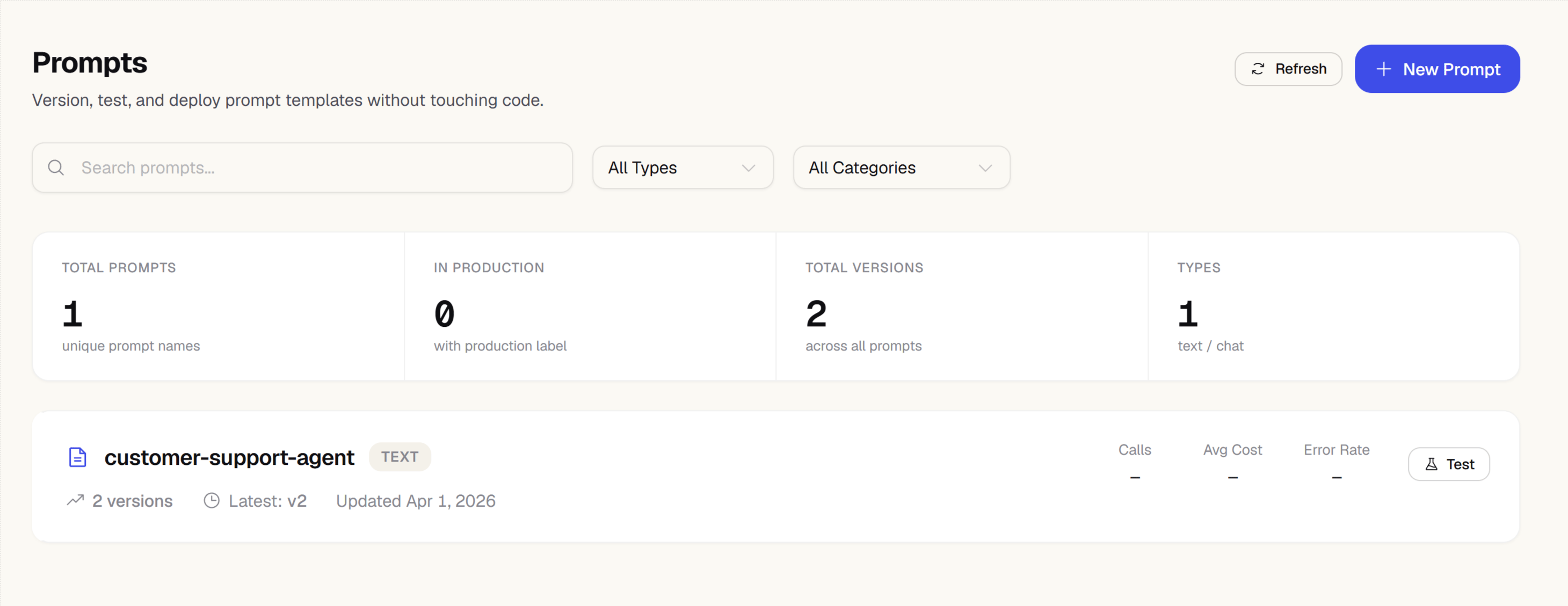
The prompt library
The main Prompts page shows all prompts in your project as a list. Each row shows the prompt name, the number of versions, which labels are active, and when it was last updated. Prompts are grouped by folder. Ungrouped prompts appear first, followed by each folder’s prompts — see Organizing prompts into folders below. Click any prompt to open its detail view.Creating a prompt
1
Click New prompt
On the main Prompts page, click New prompt.
2
Choose a name
Enter a slug-style name for the prompt, e.g.
support-reply or product-description-generator. This name is used by the SDK to fetch the prompt at runtime.3
Add a folder (optional)
Assign the prompt to an existing folder, or leave it ungrouped. Folders are purely organizational — you can move the prompt into a different folder later without affecting its name or version history.
4
Choose a type
- Text — a single string with
{{variable}}placeholders for dynamic content - Chat — an array of message objects (
role,content) with placeholder support
5
Write the prompt
Enter your prompt in the editor. Use
{{variable_name}} syntax for any values you want to substitute at runtime.6
Add model config (optional)
Optionally fill in suggested model, temperature, and max_tokens. These are stored with the prompt (and versioned along with it) for reference but are not enforced by the SDK — you decide whether to use them.
7
Set a label
Assign a label, typically
staging, to this initial version.8
Add a commit message
Write a short description of what this version contains. Commit messages appear in the version history.
9
Save
Click Save. Version 1 is created and ready to fetch via the SDK.
Organizing prompts into folders
As your prompt library grows, group related prompts into folders — for example, one folder per feature or per customer-facing surface. Moving a prompt to a folder never changes its name, so anything fetching it via the SDK is unaffected.1
Open the prompt's actions menu
From the main Prompts page, click the actions menu next to the prompt you want to organize.
2
Click Move to folder
Select Move to folder from the menu.
3
Choose or create a folder
Start typing a folder name — existing folder names autocomplete as you type. Enter a name that doesn’t exist yet to create a new folder on the fly.
4
Confirm the move
Click Move. The prompt now appears under that folder on the main Prompts page.
The prompt detail view
Opening a prompt takes you to a detail view with seven tabs:
Each version’s row on the Versions tab also shows call count, error rate, and cost/call for the selected time window, and a Test button in the page header jumps you into the full Playground seeded with this prompt’s text.
Labels and promotion
Labels are mutable pointers to specific prompt versions. The recommended workflow is:- Create a new version — it starts as a draft with no label.
- Click Set staging to test it, or click Release to promote it directly to
production. - Your application code fetches prompts by label:
Promoting a version to
production fires an automatic regression check: Zespan compares evaluator scores between the new production version and the version it replaced, and — if any evaluator dropped more than 10 percentage points — creates a quality_regression notification. The Versions tab also shows this inline as an alert with Roll back and Fix with AI actions.Protected labels
Some labels — such asproduction — can be locked so that only users with Admin or Owner roles can move them. Configure protected labels in Settings → Prompts. This prevents accidental promotion from a Member-level account.
The quality gate
Before you trust a draft version, run it through the quality gate: it scores a dataset run of the candidate version, compares that score against a scored baseline run (by default, the run tied to whatever currently holds theproduction label), and returns a pass/fail verdict.
The gate checks three things:
To run the gate from the Versions tab:
1
Pick a dataset and evaluator
Choose the dataset to score against and the evaluator to use as the judge.
2
Produce a dataset run for the candidate version
Either click Run over dataset to have Zespan execute this version against every item in the dataset for you, or produce the run yourself from your own pipeline/CI (a code snippet is shown if no run is linked yet) and select it as the candidate.
3
Run the gate
Click Run gate. If the candidate run isn’t scored yet, Zespan scores it first (this can take a few seconds — the UI polls automatically), then compares it to the baseline.
4
Read the verdict
A pass/fail banner, the three threshold tiles, a per-item score table (regressions sorted first), and a per-tool accuracy breakdown.
Run over dataset and gate scoring (when the candidate run isn’t already scored) both execute real model calls, so they require an LLM connection configured for your project. If none is configured, you’ll see a Connect a provider prompt instead of a run.
POST /v1/prompts/{name}/versions/{version}/gate, and a prompt edited in the dashboard and one edited in a pull request are held to the identical bar. See the Use tab for the linking snippet, or use the zespan-gate CLI to poll the route and turn the verdict into a CI exit code without writing the polling logic yourself.
Blast radius
The Versions tab also shows a blast radius card: which agents (byagent_name) called the version currently holding the production label in the last 24 hours, and how many calls each made. This tells you who’s actually exposed before you promote or roll back — a change that looks safe on paper can still be high-blast-radius if a critical agent depends on it.
Blast radius before releasing
Separately from the card above, clicking Release opens a confirmation dialog that shows a broader impact summary before the promotion goes through: every agent, environment, and — going further than the last-24-hours card — every prompt/model/policy dependency reachable from this prompt across your full dependency graph, plus 30-day call volume and cost. It flags explicitly when production is among the affected environments. This check is advisory only — it never blocks a release, unlike the equivalent check on deleting an evaluator, which does block. See Blast Radius for the full model: how declared (configured) and observed (actually-called) dependencies differ, how depth/traversal is bounded, and the underlying API.Deployment history
Every promotion and rollback is recorded and shown newest-first on the Versions tab, including which version moved to which label and whether the quality gate passed for that release.Rollback
Roll back re-points theproduction label to the version it pointed at immediately before the most recent promotion — it undoes the last release, not an arbitrary older version. Click Roll back next to the current production version, or from the regression alert if one is showing.
You can also roll back via ZespanPilot: “Roll back the support-reply prompt.”
Enhance
The Enhance tab rewrites a text prompt using its own real production failures, not generic advice. It pulls the version’s recent failing generations from your traces, clusters them by root cause with an AI call, and proposes a rewrite that targets the top cause — every claim in the rewrite is backed by real trace IDs you can open.1
Choose what the rewrite should optimize for
Pick one or more goals: fix the top failure cause, cut token cost, tighten tone/format, or add safety constraints.
2
Generate
Click Generate rewrite. Zespan needs at least 5 failing generations linked to this version to ground a rewrite — with fewer, it tells you honestly rather than fabricating a generic suggestion.
3
Review the proposed draft
The result shows the failure clusters found, the proposed rewrite, and a projected impact — clearly labeled as an estimate, not a measurement.
4
Save as a draft or save and release
Edit the proposed text if you want, then save it as a new (unlabeled) draft version, or save and promote it straight to production.
Enhance is available on the Pro plan and above. Unlike Playground, run-over-dataset, and the quality gate’s judge scoring, it does not require you to configure your own LLM connection — it works out of the box.
Dependency tracking
A prompt can embed another prompt’s content by reference, using an inline@@@zespanPrompt:name=<name>|version=<n>@@@ (or |label=<label>) token inside its text — for example, a system prompt that pulls in a shared policy block maintained as its own prompt. When you save a version containing one of these references, Zespan resolves it, substitutes the referenced prompt’s content, and validates there’s no circular or missing dependency before the save succeeds.
Webhooks
Configure webhooks to notify external systems whenever your prompt library changes — for example, posting to a Slack channel when a new version ships, or kicking off a deploy when a label moves toproduction.
From the main Prompts page, click Webhooks to manage them.
Each webhook fires on one or more of these events:
Creating a webhook
1
Open the Webhooks page
From the Prompts section, click Webhooks.
2
Click New webhook
The webhook creation dialog opens.
3
Name the webhook
Give it a descriptive name, e.g.
slack-prompt-alerts or deploy-on-promote.4
Choose a channel
- HTTPS endpoint — enter the URL that should receive delivery payloads
- Slack — paste a Slack incoming-webhook URL to post directly to a channel
5
Select events
Choose which of
version.created, label.assigned, and version.deleted should trigger this webhook.6
Enable and save
Turn the webhook on and click Save.
We validate that your webhook URL points to a reachable public endpoint. Internal or private network addresses are rejected.
Verifying deliveries
Every delivery is signed with your webhook secret. Zespan sends the signature in theX-Zespan-Signature-256 header as sha256=<hex digest> — the same convention GitHub webhooks use — so you can verify a payload genuinely came from Zespan before acting on it.
If a delivery fails due to a transient error, Zespan retries it automatically.