> ## Documentation Index
> Fetch the complete documentation index at: https://docs.zespan.com/llms.txt
> Use this file to discover all available pages before exploring further.
# Span kinds reference
> Complete reference for all Zespan span kinds — what each represents, when it is emitted, and how it appears in the trace flame graph and agent registry.
Every span in Zespan has a `span_kind` field that describes the type of operation it represents. The span kind controls how the span is rendered in the flame graph, which icon it gets in the trace detail view, and how it is counted in agent analytics. Understanding span kinds is essential for building multi-agent systems that look correct in the dashboard.
## Complete span kind reference
A direct call to a language model API. This is the most common span kind. Set automatically by all provider wrappers (`wrapOpenAI`, `wrapAnthropic`, `wrapGoogle`, `wrapGoogleGenAI`, etc.).
An image generation call. Set automatically when a Gemini image model (e.g. `gemini-3.1-flash-image`) returns `inline_data` parts, or when `ai.models.generateImages()` is called via the `@google/genai` SDK.
A video generation call. Set automatically when `ai.models.generateVideos()` is called (Veo models). Tracks initiation latency; the actual video is retrieved separately via the returned long-running operation.
A text embedding call. Set automatically when `ai.models.embedContent()` or `genai.embed_content()` is used. `output_tokens` is always 0; cost is calculated on input tokens only.
The execution scope of a single agent. Created by `withAgent()` in TypeScript, `with_agent()` in Python, and the ADK/LangChain integrations automatically. Contains all child spans produced during the agent's run.
A single tool or function invocation by an agent. Created by `agent.traceTool()` or automatically by the LangChain and ADK integrations when a tool is called.
A planning step created by `agent.logPlan()`. Records the steps the agent intends to take before executing them. Useful for debugging agent reasoning.
An agent-to-agent delegation. Created by `agent.delegateTo()` or automatically by multi-agent frameworks. Links to the target agent span in the trace tree.
A document retrieval operation (vector search, keyword search, hybrid). Set on manual spans in RAG pipelines via `startSpan({ span_kind: "retriever" })` or automatically by the LangChain retriever handler.
A guardrail check execution. Set automatically when the SDK's guardrail client makes a check request. Shows pre/post phase, action taken (allowed/blocked/redacted), and latency.
A generic custom operation that doesn't fit another category. The default for manually created spans that don't specify a `span_kind`.
***
## Flame graph rendering
Each span kind is rendered differently in the trace flame graph:
| Span kind | Color (dark theme) | Icon | Indentation |
| ----------- | ------------------ | -------- | ---------------------------- |
| `llm` | Cyan (`#00d4ff`) | CPU chip | Based on nesting depth |
| `image_gen` | Pink | Image | Based on nesting depth |
| `video_gen` | Violet | Video | Based on nesting depth |
| `embedding` | Teal | Brackets | Based on nesting depth |
| `agent` | Purple | Bot | Creates a group header |
| `tool` | Amber | Wrench | Child of agent span |
| `planning` | Slate | List | Child of agent span |
| `handoff` | Blue | Arrow | Child of agent span |
| `retriever` | Green | Search | Child of LLM or general span |
| `guardrail` | Orange | Shield | Before/after LLM span |
| `general` | Gray | Circle | Based on nesting depth |
***
## Setting span kind manually
When creating a manual span with `startSpan()`, set the `span_kind` explicitly:
```typescript theme={"theme":{"light":"github-light","dark":"one-dark-pro"}}
import { startSpan } from "@zespan/sdk";
// Retrieval span
const { span } = startSpan({
name: "vector-search",
span_kind: "retriever",
provider: "custom",
});
try {
const docs = await vectorStore.search(query, { topK: 5 });
await span.end({ status: "success" });
return docs;
} catch (err) {
await span.end({ status: "error", error_message: String(err) });
throw err;
}
```
```python theme={"theme":{"light":"github-light","dark":"one-dark-pro"}}
from zespan import start_span
with start_span(name="vector-search", span_kind="retriever", provider="custom") as span:
docs = vector_store.search(query, top_k=5)
```
***
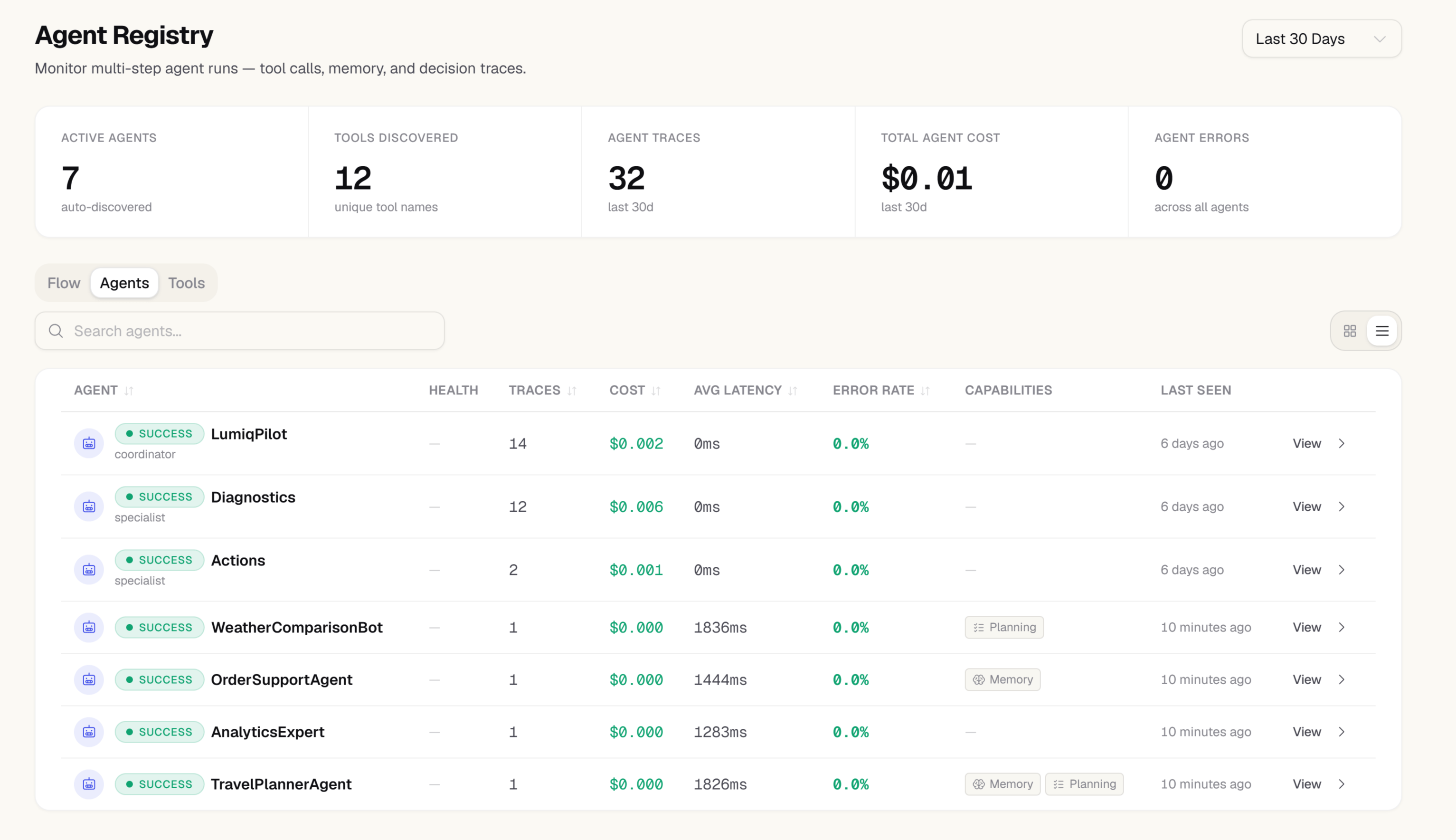
## How span kinds appear in the agent registry
The **Agents** section of the dashboard uses span kinds to build its agent registry:
* Spans with `span_kind: "agent"` appear as agent nodes
* Their `parent_span_id` is used to build the coordinator-specialist hierarchy
* `tool` spans are aggregated under their parent agent to build the tool inventory
* `handoff` spans are used to draw delegation arrows between agents
To have your agent appear correctly in the registry, always set `agentRole: "coordinator"` on orchestrators and `agentRole: "specialist"` on sub-agents.
 ***
## SpanKind in the event schema
The `span_kind` field is part of the `ZespanEvent` schema sent to the ingest endpoint. When building a custom integration (not using an SDK wrapper), include it explicitly:
```json theme={"theme":{"light":"github-light","dark":"one-dark-pro"}}
{
"event_id": "...",
"trace_id": "...",
"span_id": "...",
"span_kind": "tool",
"provider": "custom",
"model": "custom",
"operation": "tool-call",
...
}
```
Valid values: `"llm"`, `"image_gen"`, `"video_gen"`, `"embedding"`, `"agent"`, `"tool"`, `"planning"`, `"handoff"`, `"retriever"`, `"guardrail"`, `"general"`.
***
## SpanKind in the event schema
The `span_kind` field is part of the `ZespanEvent` schema sent to the ingest endpoint. When building a custom integration (not using an SDK wrapper), include it explicitly:
```json theme={"theme":{"light":"github-light","dark":"one-dark-pro"}}
{
"event_id": "...",
"trace_id": "...",
"span_id": "...",
"span_kind": "tool",
"provider": "custom",
"model": "custom",
"operation": "tool-call",
...
}
```
Valid values: `"llm"`, `"image_gen"`, `"video_gen"`, `"embedding"`, `"agent"`, `"tool"`, `"planning"`, `"handoff"`, `"retriever"`, `"guardrail"`, `"general"`.