> ## Documentation Index
> Fetch the complete documentation index at: https://docs.zespan.com/llms.txt
> Use this file to discover all available pages before exploring further.
# Guardrails — configure content safety policies
> Create and manage guardrail policies in the Zespan dashboard to block, redact, or flag unsafe LLM inputs and outputs without redeploying your application.
The Guardrails page is where you define the content safety policies that the Zespan SDK enforces at runtime. Policies are evaluated server-side on every check request from the SDK — you can update, enable, or disable them without touching your application code.
 The Guardrails page is available on the **Pro** plan and above — the Free plan has no access. Creating, editing, or deleting a guardrail additionally requires the **Scale** plan; on Pro and Team you can view existing guardrails and their execution history, but mutating actions return an upgrade prompt.
## How guardrails work
When your SDK is initialized with `guardrails: true` on a provider wrapper, it sends a check request to `POST /v1/guardrails/check` before the LLM call (pre-check) and after the LLM response (post-check). The backend evaluates all active policies for your project against the content and returns a verdict.
The SDK receives the verdict and either:
* **Allows** the call to proceed normally
* **Blocks** it by throwing a `GuardrailBlockedError`
* **Redacts** sensitive content and substitutes the cleaned text
* **Warns** (logs the trigger but allows the call through)
See the [SDK guardrails guide](/sdk/guardrails) for how to handle these verdicts in your application code.
## Creating a guardrail
Navigate to **Guardrails** in the left sidebar.
The guardrail creation dialog opens.
Give it a descriptive name that explains what it protects against, e.g. `block-competitor-mentions` or `toxicity-filter`.
Select the type of check to run. The dropdown lists each type by its identifier, shown here alongside what it does:
| Type | What it does |
| ------------------------------------------------ | ---------------------------------------------------------------------------------------------------------------------------------------------------- |
| `pii` — **PII detection** | Detects personal information (emails, phone numbers, credit cards, SSNs, IPs, names, and more) and can redact it in place |
| `toxicity` — **Toxicity filter** | Flags toxic, harassing, or threatening language at a configurable sensitivity (low/medium/high) |
| `topic_boundary` — **Topic boundary** | Blocks content matching a keyword blocklist, or requires it to match an allowlist |
| `regex` — **Regex block** | Blocks content matching one or more regular expressions you define |
| `format` — **Output format** | Validates that a response is valid JSON and contains any required fields — intended for post-response checks |
| `cost_ceiling` — **Cost ceiling** | Blocks a call whose estimated cost or input token count exceeds a limit you set — intended for pre-call checks |
| `custom_llm` — **Custom LLM judge** (deprecated) | Runs your own evaluation prompt against the content and blocks/warns based on a pass/fail score. Deprecated in favor of `regex` — see the note below |
The following types apply specifically to agent traces — they inspect tool calls and agent names rather than raw prompt/response text:
| Type | What it does |
| ------------------------------------------------------ | -------------------------------------------------------------------------------------------------------------------------------- |
| `agent_rate_limit` — **Agent rate limit** | Caps how many requests, tokens, or dollars an agent can consume in a time window — intended for pre-call checks |
| `tool_misuse` — **Tool misuse** | Blocks disallowed tools, or a tool that's been called too many times in one trace — intended for pre-call checks |
| `loop_detection` — **Loop detection** | Blocks an agent that repeats the same tool call (with the same arguments) too many times in a row — intended for pre-call checks |
| `agent_misuse` — **Prompt injection / goal hijacking** | Detects prompt injection, jailbreak, and goal-hijacking attempts at a configurable sensitivity |
| `scope_enforcement` — **Scope enforcement** | Keeps an agent's output within an allowed set of topics via keyword allow/blocklists |
| `delegation_control` — **Delegation control** | Restricts which agents another agent is allowed to hand off (delegate) to — intended for pre-call checks |
Most types can run on pre-LLM checks, post-LLM checks, or both — see the next step for how to pick.
`custom_llm` is deprecated — Zespan steers new policies toward `regex` instead. It still works if you already have one configured, but prefer `regex` (or another pattern-based type above) for new guardrails.
Fill in the type-specific settings. For keyword-based types (topic boundary, scope enforcement, tool misuse allow/blocklists), enter the terms. For regex, enter the patterns. For toxicity and prompt-injection types, pick a sensitivity level (low/medium/high). For PII detection, choose a compliance preset and, optionally, fine-tune the confidence threshold under advanced detection. For custom LLM judge, write your evaluation prompt.
Choose what happens when the guardrail triggers:
* **Block** — reject the request and throw `GuardrailBlockedError` in the SDK
* **Redact** — remove the matched content and use the cleaned text
* **Warn** — allow the request but surface the trigger as a warning
* **Log** — allow the request and record the trigger in execution history, without surfacing it as a warning (useful while you're still tuning a new policy)
Select whether the policy applies to pre-LLM checks (the prompt), post-LLM checks (the completion), or both.
By default a guardrail applies **project-wide** — every trace in the project is checked against it. If you only want it enforced for specific agents (for example, a policy that should only run against your refund-processing agent, not your general chat agent), switch to **Specific agents** and add the agent names it should apply to. Traces from agents not in the list skip this guardrail entirely.
Click **Save**. The policy activates immediately — all subsequent SDK check requests will include this policy.
Before saving, use the **Live Test** panel in the creation form to run sample text through the guardrail you're configuring — see [Testing a guardrail](#testing-a-guardrail) below.
## Promoting a violation to a policy
Every guardrail hit recorded against a trace can become a permanent rule with one click, right from where it happened — no need to reconstruct the pattern from scratch.
Find the trace with the violation you want to codify. The guardrail hit shows as its own span in the flame graph, colored to match its outcome.
Click it to see the policy, the check phase, and the exact value that triggered it.
Zespan pre-fills a new guardrail draft with the same tool, field, and value that triggered the violation.
Adjust the draft if you want — tighten a keyword list, change the action, scope it to specific agents — then save it like any other guardrail.
This is the fastest way to turn a one-off bad response you noticed into a rule that catches every future occurrence.
## Guardrail templates
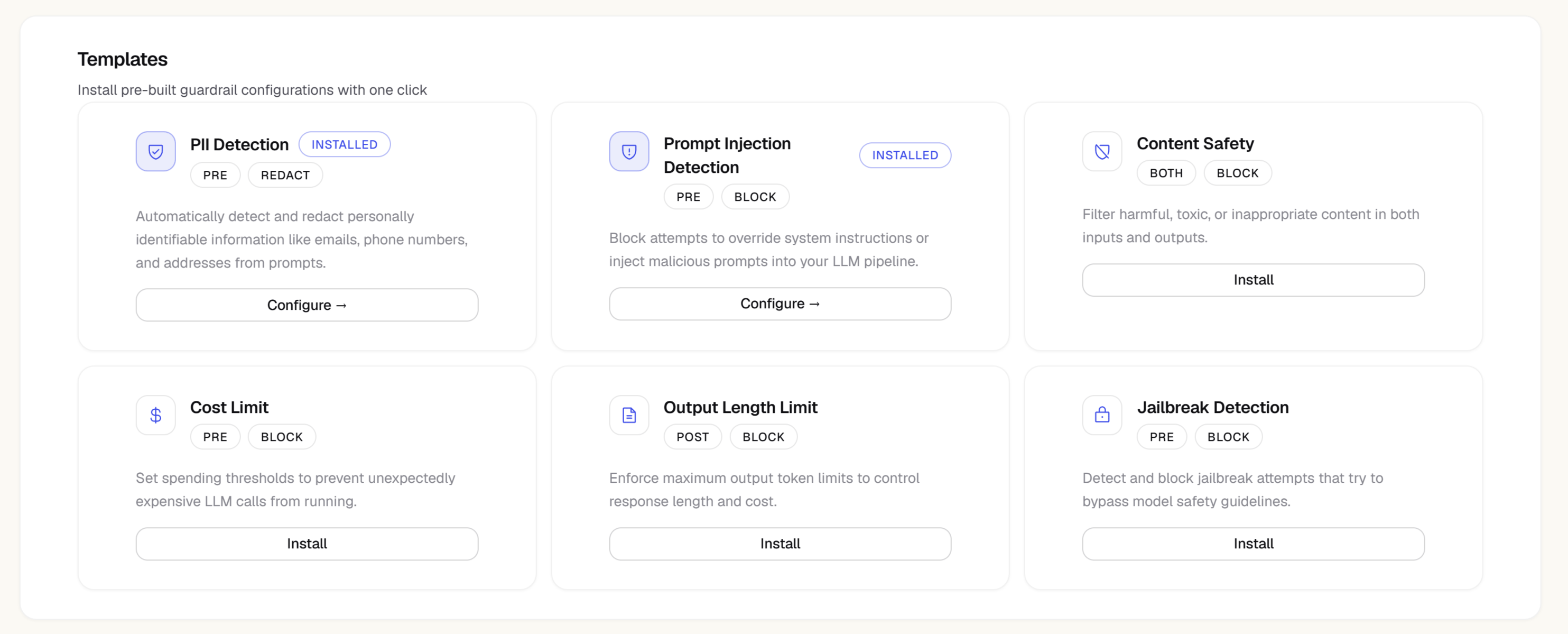
Instead of creating guardrails one at a time, you can bundle several rules into a reusable **template** and apply that bundle to a project (optionally scoped to specific agents, the same way a single guardrail can be).
Zespan ships a set of **preset templates** that are managed and auto-updated with new threat patterns:
| Preset | What it bundles |
| ----------------- | --------------------------------------------------------------------------------------------------------------------------------- |
| Jailbreak Shield | Prompt-injection detection plus scope enforcement, across all agents |
| PII Protection | PII detection tuned to block SSNs and credit cards, warn on emails and phone numbers, plus regex rules for common API key formats |
| Content Safety | Toxicity filtering plus a topic-boundary warning for off-topic responses |
| Agent Safety Pack | Tool misuse, loop detection, delegation control, and agent rate limiting together |
From the **Templates** tab you can:
* **Apply** a preset or a custom template to your project, project-wide or scoped to specific agents
* **Clone** a preset into an editable copy you can tweak (presets themselves can't be edited or deleted)
* **Create** your own template from scratch by combining any of the guardrail types above into one bundle
* **Edit** or **delete** your own templates, and **remove** an application without deleting the template itself
Applied templates run alongside any standalone guardrails you've created — both are evaluated on every check request.
## Managing guardrails
The main Guardrails page shows a card for every configured policy, alongside a trend chart of block activity across all your guardrails. Each card shows:
| Field | Description |
| ------------------------------------------- | ---------------------------------------------------------- |
| Name | The policy identifier |
| Type | The guardrail mechanism (`pii`, `toxicity`, etc.) |
| Phase | Pre, post, or both |
| Action | What happens on trigger (block, redact, warn, log) |
| Scope | "project-wide", or the specific agent names it's scoped to |
| Checks / Blocked / Block rate / Avg latency | Rolling metrics for the selected time range |
| Status | Enabled / disabled toggle |
Use the **Status** toggle to disable a guardrail without deleting it — disabled guardrails are skipped during checks.
Click through to a guardrail to open its detail page, with **Configure**, **Test**, and **Logs** tabs for editing settings, running the guardrail against sample text, and reviewing its recent trigger history.
## Execution history
The main Guardrails page also includes a log of recent guardrail events (and each guardrail's own Logs tab shows just its events), with:
* Timestamp
* The guardrail and check phase (pre/post)
* The action taken (blocked, redacted, warned, logged)
* The reason the guardrail triggered (e.g. which PII types or keyword matched — not the full prompt)
* A link to the underlying trace
From the main Guardrails page, each event has a **Mark as False Positive** button. Feedback you submit rolls up into a false positive rate shown on that guardrail's card, so you can see at a glance whether a policy is producing mostly genuine catches or noise.
If a guardrail is triggering frequently, review its execution history and mark any false positives. You can then adjust the keyword list, sensitivity, or confidence threshold without redeploying.
## Testing a guardrail
Every guardrail (and the form for a new one) has a test panel where you can paste sample text and run it through the guardrail's current configuration — this evaluates the real rule synchronously and returns a verdict, without needing a live trace from your application:
* While creating a guardrail, the test panel runs against your unsaved draft settings
* On an existing guardrail's **Test** tab, it runs against the saved configuration
* You can optionally supply a model name, operation name, estimated cost, and input token count — the cost ceiling type checks these directly
* The result shows an overall **Allowed** / **Blocked** verdict, the modified text (if a redact rule matched), and a per-guardrail breakdown of which rule fired, what action it took, whether it passed, and its latency
The test panel evaluates text content only. Agent-context checks that depend on the calling agent's name or its recent tool calls — agent rate limit, tool misuse, loop detection, and delegation control — always pass in the test panel, since that context only exists on a real trace. Validate those types by checking their execution history after live traffic runs through them.
Use this to validate a policy change before it affects real traffic.
## Latency impact
Guardrail checks add latency to your LLM calls. The check runs synchronously before (and optionally after) the LLM call. Typical check latency:
| Guardrail type | Typical latency |
| -------------------------------------------------------------------------------------------------------------------------------------------------------------------------- | --------------- |
| Pattern/rule-based (regex, topic boundary, toxicity, scope enforcement, prompt injection, tool misuse, loop detection, delegation control, cost ceiling, agent rate limit) | \< 5ms |
| PII detection | 20–50ms |
| Custom LLM judge (deprecated) | 200–800ms |
Custom LLM judge is deprecated — use `regex` (or another pattern-based type above) for new guardrails instead. It's also the only type that calls a model for every check, adding real latency; every other type runs entirely on pattern matching, keyword lists, or counters.
## Human approval gates
Beyond automatic block, redact, and warn actions, the SDK exposes a real human-in-the-loop primitive: `awaitApproval()` pauses execution until an admin approves or rejects the call from the dashboard — not just a log entry, an actual gate your code waits on.
```typescript TypeScript theme={"theme":{"light":"github-light","dark":"one-dark-pro"}}
import { zespan } from "@zespan/sdk";
const client = zespan.getClient();
// Blocks until an admin approves or rejects from the Approvals inbox
await client.awaitApproval("delete_database", { table: "users" });
// throws ApprovalRejectedError / ApprovalTimeoutError, or resolves silently on approval
```
```python Python theme={"theme":{"light":"github-light","dark":"one-dark-pro"}}
from zespan import get_client
client = get_client()
# Blocks until an admin approves or rejects from the Approvals inbox
client.await_approval("delete_database", {"table": "users"})
# raises ApprovalRejectedError / ApprovalTimeoutError, or returns silently on approval
```
Pending requests appear in the **Approvals** inbox (Guardrails → **Approvals** tab) with the tool name, its arguments, and the requesting agent. An Owner or Admin approves or rejects each one; your application resumes — or raises the corresponding error — as soon as a decision is made.
Reserve this for genuinely high-risk or irreversible tool calls — deleting data, sending money, publishing externally — where you want a human in the loop before the action executes, not a warning after the fact.
## Near-miss capture and suggested rules
Zespan also learns from traffic that almost triggered a numeric guardrail rule but didn't. When a threshold-based check — `cost_ceiling`, `agent_rate_limit`, and similar types — evaluates close to its limit without firing, that near-miss is logged instead of silently discarded.
A background worker clusters recurring near-misses into **suggested policy rules**, surfaced in a panel on the Guardrails page: *"Your agents have hit this pattern 6 times this week — no rule governs it yet. Want one?"*
* Click **Promote to Policy** on a suggestion you agree with — it reuses the same promote flow described [above](#promoting-a-violation-to-a-policy)
* Click **Dismiss** to clear a suggestion that isn't worth a standing rule
This means your policy set gets measurably stricter over time from real agent behavior, instead of staying a static list someone wrote once.
## Plan requirement
The Guardrails page itself is available from the **Pro** plan up. Creating, editing, or deleting a guardrail requires the **Scale** plan — on Pro or Team, the form shows "Upgrade to the Scale plan to create guardrails" instead of saving the change.
The Guardrails page is available on the **Pro** plan and above — the Free plan has no access. Creating, editing, or deleting a guardrail additionally requires the **Scale** plan; on Pro and Team you can view existing guardrails and their execution history, but mutating actions return an upgrade prompt.
## How guardrails work
When your SDK is initialized with `guardrails: true` on a provider wrapper, it sends a check request to `POST /v1/guardrails/check` before the LLM call (pre-check) and after the LLM response (post-check). The backend evaluates all active policies for your project against the content and returns a verdict.
The SDK receives the verdict and either:
* **Allows** the call to proceed normally
* **Blocks** it by throwing a `GuardrailBlockedError`
* **Redacts** sensitive content and substitutes the cleaned text
* **Warns** (logs the trigger but allows the call through)
See the [SDK guardrails guide](/sdk/guardrails) for how to handle these verdicts in your application code.
## Creating a guardrail
Navigate to **Guardrails** in the left sidebar.
The guardrail creation dialog opens.
Give it a descriptive name that explains what it protects against, e.g. `block-competitor-mentions` or `toxicity-filter`.
Select the type of check to run. The dropdown lists each type by its identifier, shown here alongside what it does:
| Type | What it does |
| ------------------------------------------------ | ---------------------------------------------------------------------------------------------------------------------------------------------------- |
| `pii` — **PII detection** | Detects personal information (emails, phone numbers, credit cards, SSNs, IPs, names, and more) and can redact it in place |
| `toxicity` — **Toxicity filter** | Flags toxic, harassing, or threatening language at a configurable sensitivity (low/medium/high) |
| `topic_boundary` — **Topic boundary** | Blocks content matching a keyword blocklist, or requires it to match an allowlist |
| `regex` — **Regex block** | Blocks content matching one or more regular expressions you define |
| `format` — **Output format** | Validates that a response is valid JSON and contains any required fields — intended for post-response checks |
| `cost_ceiling` — **Cost ceiling** | Blocks a call whose estimated cost or input token count exceeds a limit you set — intended for pre-call checks |
| `custom_llm` — **Custom LLM judge** (deprecated) | Runs your own evaluation prompt against the content and blocks/warns based on a pass/fail score. Deprecated in favor of `regex` — see the note below |
The following types apply specifically to agent traces — they inspect tool calls and agent names rather than raw prompt/response text:
| Type | What it does |
| ------------------------------------------------------ | -------------------------------------------------------------------------------------------------------------------------------- |
| `agent_rate_limit` — **Agent rate limit** | Caps how many requests, tokens, or dollars an agent can consume in a time window — intended for pre-call checks |
| `tool_misuse` — **Tool misuse** | Blocks disallowed tools, or a tool that's been called too many times in one trace — intended for pre-call checks |
| `loop_detection` — **Loop detection** | Blocks an agent that repeats the same tool call (with the same arguments) too many times in a row — intended for pre-call checks |
| `agent_misuse` — **Prompt injection / goal hijacking** | Detects prompt injection, jailbreak, and goal-hijacking attempts at a configurable sensitivity |
| `scope_enforcement` — **Scope enforcement** | Keeps an agent's output within an allowed set of topics via keyword allow/blocklists |
| `delegation_control` — **Delegation control** | Restricts which agents another agent is allowed to hand off (delegate) to — intended for pre-call checks |
Most types can run on pre-LLM checks, post-LLM checks, or both — see the next step for how to pick.
`custom_llm` is deprecated — Zespan steers new policies toward `regex` instead. It still works if you already have one configured, but prefer `regex` (or another pattern-based type above) for new guardrails.
Fill in the type-specific settings. For keyword-based types (topic boundary, scope enforcement, tool misuse allow/blocklists), enter the terms. For regex, enter the patterns. For toxicity and prompt-injection types, pick a sensitivity level (low/medium/high). For PII detection, choose a compliance preset and, optionally, fine-tune the confidence threshold under advanced detection. For custom LLM judge, write your evaluation prompt.
Choose what happens when the guardrail triggers:
* **Block** — reject the request and throw `GuardrailBlockedError` in the SDK
* **Redact** — remove the matched content and use the cleaned text
* **Warn** — allow the request but surface the trigger as a warning
* **Log** — allow the request and record the trigger in execution history, without surfacing it as a warning (useful while you're still tuning a new policy)
Select whether the policy applies to pre-LLM checks (the prompt), post-LLM checks (the completion), or both.
By default a guardrail applies **project-wide** — every trace in the project is checked against it. If you only want it enforced for specific agents (for example, a policy that should only run against your refund-processing agent, not your general chat agent), switch to **Specific agents** and add the agent names it should apply to. Traces from agents not in the list skip this guardrail entirely.
Click **Save**. The policy activates immediately — all subsequent SDK check requests will include this policy.
Before saving, use the **Live Test** panel in the creation form to run sample text through the guardrail you're configuring — see [Testing a guardrail](#testing-a-guardrail) below.
## Promoting a violation to a policy
Every guardrail hit recorded against a trace can become a permanent rule with one click, right from where it happened — no need to reconstruct the pattern from scratch.
Find the trace with the violation you want to codify. The guardrail hit shows as its own span in the flame graph, colored to match its outcome.
Click it to see the policy, the check phase, and the exact value that triggered it.
Zespan pre-fills a new guardrail draft with the same tool, field, and value that triggered the violation.
Adjust the draft if you want — tighten a keyword list, change the action, scope it to specific agents — then save it like any other guardrail.
This is the fastest way to turn a one-off bad response you noticed into a rule that catches every future occurrence.
## Guardrail templates
Instead of creating guardrails one at a time, you can bundle several rules into a reusable **template** and apply that bundle to a project (optionally scoped to specific agents, the same way a single guardrail can be).
Zespan ships a set of **preset templates** that are managed and auto-updated with new threat patterns:
| Preset | What it bundles |
| ----------------- | --------------------------------------------------------------------------------------------------------------------------------- |
| Jailbreak Shield | Prompt-injection detection plus scope enforcement, across all agents |
| PII Protection | PII detection tuned to block SSNs and credit cards, warn on emails and phone numbers, plus regex rules for common API key formats |
| Content Safety | Toxicity filtering plus a topic-boundary warning for off-topic responses |
| Agent Safety Pack | Tool misuse, loop detection, delegation control, and agent rate limiting together |
From the **Templates** tab you can:
* **Apply** a preset or a custom template to your project, project-wide or scoped to specific agents
* **Clone** a preset into an editable copy you can tweak (presets themselves can't be edited or deleted)
* **Create** your own template from scratch by combining any of the guardrail types above into one bundle
* **Edit** or **delete** your own templates, and **remove** an application without deleting the template itself
Applied templates run alongside any standalone guardrails you've created — both are evaluated on every check request.
## Managing guardrails
The main Guardrails page shows a card for every configured policy, alongside a trend chart of block activity across all your guardrails. Each card shows:
| Field | Description |
| ------------------------------------------- | ---------------------------------------------------------- |
| Name | The policy identifier |
| Type | The guardrail mechanism (`pii`, `toxicity`, etc.) |
| Phase | Pre, post, or both |
| Action | What happens on trigger (block, redact, warn, log) |
| Scope | "project-wide", or the specific agent names it's scoped to |
| Checks / Blocked / Block rate / Avg latency | Rolling metrics for the selected time range |
| Status | Enabled / disabled toggle |
Use the **Status** toggle to disable a guardrail without deleting it — disabled guardrails are skipped during checks.
Click through to a guardrail to open its detail page, with **Configure**, **Test**, and **Logs** tabs for editing settings, running the guardrail against sample text, and reviewing its recent trigger history.
## Execution history
The main Guardrails page also includes a log of recent guardrail events (and each guardrail's own Logs tab shows just its events), with:
* Timestamp
* The guardrail and check phase (pre/post)
* The action taken (blocked, redacted, warned, logged)
* The reason the guardrail triggered (e.g. which PII types or keyword matched — not the full prompt)
* A link to the underlying trace
From the main Guardrails page, each event has a **Mark as False Positive** button. Feedback you submit rolls up into a false positive rate shown on that guardrail's card, so you can see at a glance whether a policy is producing mostly genuine catches or noise.
If a guardrail is triggering frequently, review its execution history and mark any false positives. You can then adjust the keyword list, sensitivity, or confidence threshold without redeploying.
## Testing a guardrail
Every guardrail (and the form for a new one) has a test panel where you can paste sample text and run it through the guardrail's current configuration — this evaluates the real rule synchronously and returns a verdict, without needing a live trace from your application:
* While creating a guardrail, the test panel runs against your unsaved draft settings
* On an existing guardrail's **Test** tab, it runs against the saved configuration
* You can optionally supply a model name, operation name, estimated cost, and input token count — the cost ceiling type checks these directly
* The result shows an overall **Allowed** / **Blocked** verdict, the modified text (if a redact rule matched), and a per-guardrail breakdown of which rule fired, what action it took, whether it passed, and its latency
The test panel evaluates text content only. Agent-context checks that depend on the calling agent's name or its recent tool calls — agent rate limit, tool misuse, loop detection, and delegation control — always pass in the test panel, since that context only exists on a real trace. Validate those types by checking their execution history after live traffic runs through them.
Use this to validate a policy change before it affects real traffic.
## Latency impact
Guardrail checks add latency to your LLM calls. The check runs synchronously before (and optionally after) the LLM call. Typical check latency:
| Guardrail type | Typical latency |
| -------------------------------------------------------------------------------------------------------------------------------------------------------------------------- | --------------- |
| Pattern/rule-based (regex, topic boundary, toxicity, scope enforcement, prompt injection, tool misuse, loop detection, delegation control, cost ceiling, agent rate limit) | \< 5ms |
| PII detection | 20–50ms |
| Custom LLM judge (deprecated) | 200–800ms |
Custom LLM judge is deprecated — use `regex` (or another pattern-based type above) for new guardrails instead. It's also the only type that calls a model for every check, adding real latency; every other type runs entirely on pattern matching, keyword lists, or counters.
## Human approval gates
Beyond automatic block, redact, and warn actions, the SDK exposes a real human-in-the-loop primitive: `awaitApproval()` pauses execution until an admin approves or rejects the call from the dashboard — not just a log entry, an actual gate your code waits on.
```typescript TypeScript theme={"theme":{"light":"github-light","dark":"one-dark-pro"}}
import { zespan } from "@zespan/sdk";
const client = zespan.getClient();
// Blocks until an admin approves or rejects from the Approvals inbox
await client.awaitApproval("delete_database", { table: "users" });
// throws ApprovalRejectedError / ApprovalTimeoutError, or resolves silently on approval
```
```python Python theme={"theme":{"light":"github-light","dark":"one-dark-pro"}}
from zespan import get_client
client = get_client()
# Blocks until an admin approves or rejects from the Approvals inbox
client.await_approval("delete_database", {"table": "users"})
# raises ApprovalRejectedError / ApprovalTimeoutError, or returns silently on approval
```
Pending requests appear in the **Approvals** inbox (Guardrails → **Approvals** tab) with the tool name, its arguments, and the requesting agent. An Owner or Admin approves or rejects each one; your application resumes — or raises the corresponding error — as soon as a decision is made.
Reserve this for genuinely high-risk or irreversible tool calls — deleting data, sending money, publishing externally — where you want a human in the loop before the action executes, not a warning after the fact.
## Near-miss capture and suggested rules
Zespan also learns from traffic that almost triggered a numeric guardrail rule but didn't. When a threshold-based check — `cost_ceiling`, `agent_rate_limit`, and similar types — evaluates close to its limit without firing, that near-miss is logged instead of silently discarded.
A background worker clusters recurring near-misses into **suggested policy rules**, surfaced in a panel on the Guardrails page: *"Your agents have hit this pattern 6 times this week — no rule governs it yet. Want one?"*
* Click **Promote to Policy** on a suggestion you agree with — it reuses the same promote flow described [above](#promoting-a-violation-to-a-policy)
* Click **Dismiss** to clear a suggestion that isn't worth a standing rule
This means your policy set gets measurably stricter over time from real agent behavior, instead of staying a static list someone wrote once.
## Plan requirement
The Guardrails page itself is available from the **Pro** plan up. Creating, editing, or deleting a guardrail requires the **Scale** plan — on Pro or Team, the form shows "Upgrade to the Scale plan to create guardrails" instead of saving the change.